Squarespace Template Customization Guide: Make It Your Own
Ever wonder if a template is the best option for you when it comes to building the pages of your website? Or maybe you already think it’s a good option for you, but you still have reservations about truly being able to get a fully custom look? Let’s dive into some cool ways to customize your website template on Squarespace so you never have to worry about it looking boring or not standing out from the billions of other websites out there!
Below, we have a great example of how different you can make a template look from when you purchase it. Using the Petal template as an example, there are many subtle enhancements you can see from start to finish that make both versions look super unique.
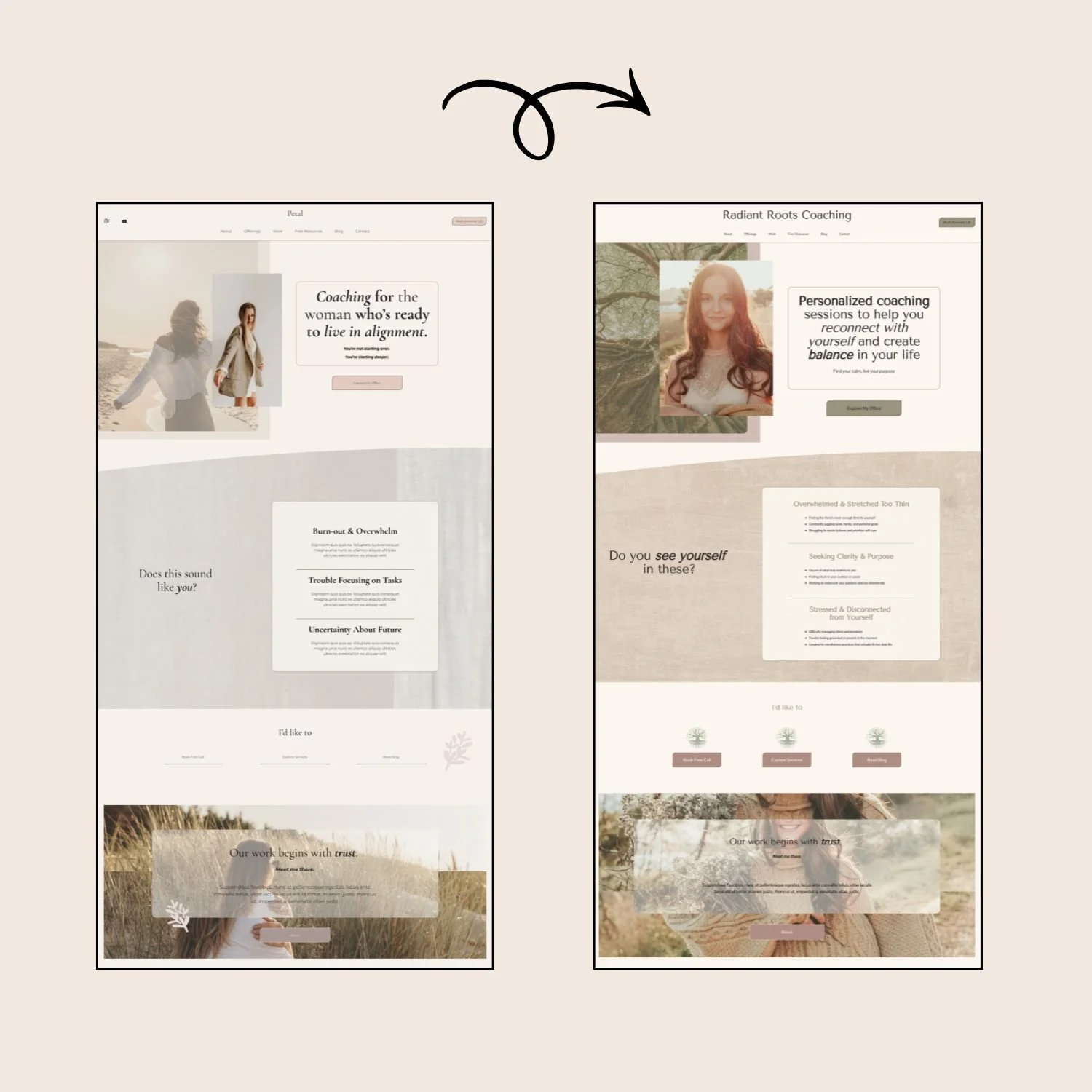
Some changes can be minor but end up making a big impact. The following are some subtle but amazing ways to make some custom looks:
Changing background image to inset. Playing around with this can have surprisingly cool effects. Click on the section, and under the background tab, set the width to Inset.
Using dividers to create a different aesthetic between sections. There are a bunch of different divider options to use at the bottom of any section. You can go with a gentle curve, as seen above, or do a wave, jagged lines, you name it. Simply click on the section, and under the design tab, you will find the Divider option. Toggle it on and have fun.
Changing the order of sections. While we placed the sections in an intentional order, you can always easily switch them around if need be. It’s another easy way to make your website look different than the template original.
Using a different shape for images. A unique feature of Squarespace is being able to easily make an image a different shape. While the above image shows both using the same standard rectangle shape for the hero image, you could always change it to a circle to change up the vibe in 2 seconds flat.
Now let’s move on to ways that you can customize your Squarespace template in bigger ways.
Fonts. You can choose from hundreds of Squarespace fonts. They have beautiful serifs, sans serifs, scripts, and beyond. Just changing the typography of your website will make a HUGE difference to the overall voice and tone of your pages.
Images. Every image that comes with your template is able to be swapped out for your photos and images that align with your unique brand. And as we saw above, you can make shapes out of them, or even add cool effects, like a scrolling parallax!
Color Palette. Changing out the colors in your template will give your website a completely new look. Squarespace has preset palettes to choose from, but for a even more custom look, we suggest choosing your own. And even better? Your template purchase comes with a color guide for helping you with putting a palette together in a variety of ways!
Layout. While we love our template layouts, we totally don’t blame you if you want to move “this” over to “there”. This will only add to the unique custom feel of your website. Squarespace makes it super easy with the 7.1 fluid engine, to drag and drop different blocks wherever you’d like them.
Ready to try your hand at customizing one of our templates? Head on over to our template shop, HERE.